Free guide · about 12 minutes to read
The 5 automations every small team should run first.
And how to switch them on the easy way: one job at a time, a person approving anything a customer will read, and nothing so clever that it breaks. Useful whether or not you ever buy software from us.
Automate the job that repeats, not the job that needs thinking.
Software is very good at doing the same small thing every time, without forgetting. It is bad at judgement: whether to give a discount, whether an order looks odd, what to say to an angry customer. So the best first automations share three things:
- They happen every day. A new enquiry, a quote sent, an order packed.
- Someone forgets them. Not because your team is careless, but because they’re busy with the customer in front of them.
- A slow answer costs you. The enquiry that waits until tomorrow can go to whoever replied first.
How we picked these five
We read what small sales teams, shop owners and estate agents ask for in software reviews, forums and buyer guides, and what they complain about after switching automation on. The same few jobs come up again and again. Most of that writing comes from reviewers and software companies, not careful studies, so treat the order below as a sensible place to start, not a law.
The five automations
Numbers 1, 2 and 3 suit almost every team that sells. Numbers 4 and 5 depend on your business: shops need the first, anyone who books visits or appointments needs the second.
Welcome every new lead within minutes
What it does. The moment a new enquiry arrives, from an ad’s lead form, an Instagram message, a WhatsApp message or your website form, the lead gets a short welcome on the same channel. At the same time it is given to one person on your team, with a task: “Call this lead.”
Set it up like this
- When
- A new lead arrives from any channel.
- Only if
- Nobody on your team has replied yet. (You can limit it to outside working hours if you prefer.)
- Do
- Send your welcome message; give the lead to the next person in turn, or always to the owner; create a “call this lead” task for them.
- The person’s part
- The call. The welcome is automatic; the conversation is human.
Why it comes first. Answering every new lead quickly came up more often than anything else in what we read. Someone who has just filled in your form is thinking about you now; tomorrow they may not be.
The one thing to get right. Write the welcome yourself, read it out loud, and approve it once before you switch it on. Keep it short and honest: who you are, that a person will call, and roughly when. Don’t pretend to be a person typing.
Without any software. In the free WhatsApp Business app, set a greeting message and one saved quick reply, and name one person each day whose job is to call every new enquiry before lunch.
Record where every lead came from
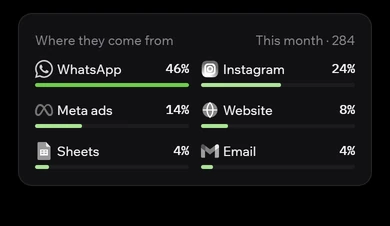
What it does. Every lead is tagged with its source when it arrives: which ad, which form, Instagram or WhatsApp. Nobody types it in. Nobody forgets.
Set it up like this
- When
- A new lead arrives.
- Do
- Add a source tag: the ad or campaign name if there is one, otherwise the channel.
- Later
- When a lead becomes a paying customer, the tag is still there.
Why it matters. The question owners most want answered is not “how many leads did this ad bring?” but “which ad brought customers who actually paid?” Ad dashboards count leads. Only your own records can count sales. If the source isn’t saved at the moment the lead arrives, you can’t answer that question later, however good your reports are.
The one thing to get right. Decide your source names once and stick to them. “FB ad”, “Facebook”, “Meta lead form” and “fb” will look like four different sources.
Without any software. Add a “Source” column to your lead sheet with a drop-down list, and make it the one column nobody is allowed to leave blank. For WhatsApp chats, ask “How did you hear about us?” in your welcome.
Follow up when a lead or quote goes quiet
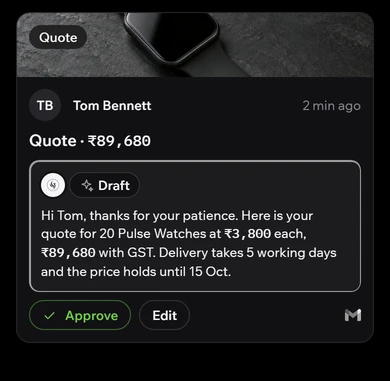
What it does. When you’ve sent a quote, a price list or a brochure and heard nothing back, the software notices and drafts a short follow-up for the person in charge to approve and send. It stops the moment the customer replies.
Set it up like this
- When
- A quote, price list or brochure is sent, or a lead hasn’t moved forward.
- Only if
- There’s been no reply for 2 days, and the deal isn’t marked won or lost.
- Do
- Draft a short, friendly follow-up for the assigned person to approve.
- Stop
- As soon as the customer replies, and tell the person. Never more than 2 or 3 nudges in total.
Why it matters. The follow-up is where sales quietly slip. Not because anyone decided to drop the lead, but because the quote went out on a busy Tuesday and nobody remembered it on Thursday.
The one thing to get right. A person approves each nudge. A follow-up sequence that someone set up once and forgot about is how customers end up getting “just checking in” three days after they already bought.
A WhatsApp rule to know. WhatsApp generally lets a business send a free-form message only within 24 hours of the customer’s last message. After that, you need a message template that Meta has approved in advance, and Meta charges for template messages. Check Meta’s current rules before you build, and write your follow-up template early.
Without any software. A “Quotes sent” sheet with the date sent, and a filter each morning for anything older than 2 days with no reply.
Order updates For shops
What it does. When an order’s status changes, confirmed, packed, shipped, delivered, the customer gets a short update on WhatsApp. For cash-on-delivery orders, the message can offer a link to pay in advance.
Set it up like this
- When
- An order’s status changes.
- Only if
- The customer has a WhatsApp number on file and has agreed to hear from you.
- Do
- Send the matching update, written and approved by you once.
Why it matters. “Where is my order?” is the message every shop answers by hand, many times a day. Order updates are among the automations shop owners praise when they work.
The one thing to get right. These messages work from your order status, so the status has to be right. If nobody marks orders “shipped”, the message never goes. Fix the habit before the automation.
Without any software. Four saved quick replies in WhatsApp Business, one for each status, and a rule that whoever changes the status sends the message.
Visit reminders and after-visit follow-up For bookings
What it does. For site visits, showroom visits, trials or appointments. A day before the visit, the customer gets a reminder and so does your team member. After the visit is marked done, the software drafts a thank-you with the brochure and a next step, for your team member to approve.
Set it up like this
- When
- A visit is booked.
- A day before
- Send the customer an approved reminder; remind your team member.
- After the visit
- Draft a thank-you and next step for your team member to approve.
- Flag
- If nothing has gone out within 2 days of the visit, tell the owner or manager.
Why it matters. After a visit, the follow-up tends to get split across a WhatsApp chat, a note in the CRM, an email with the brochure and a reminder call, so it’s easy for it to slip. One reminder and one drafted follow-up keep it in one place.
The one thing to get right. The evidence for this one is thinner than for the first three. Try it for a month and count whether more visits turn into a next step.
Without any software. A shared calendar with the customer’s number in each booking, and a saved “thanks for visiting” reply with the brochure attached.
Six things to leave alone at the start.
These sound useful and are often sold as features. Leave them until the first five are running well.
| Leave for now | Why | Do this instead |
|---|---|---|
| Birthday and anniversary messages | Hardly anyone asks for them, and outside a recent conversation they need a paid WhatsApp template. | If you want one later, add it as your own small automation. |
| Messages asking customers why they didn’t buy | Few owners ask for it, and it asks the customer to do work for you. What you actually want is to know where you lose sales. | When your team marks a deal lost, have them pick the reason in one tap. Review the reasons monthly. |
| Chatbots with lots of branches | Every extra branch is one more thing that can break, and complicated set-ups are the ones people give up on. | Simple one-line rules. Hand anything unclear to a person. |
| Decisions that need judgement: discounts, refunds, odd-looking orders | A wrong call here costs money or a customer. | Let the software flag them for a person to decide. |
| Phone calls | Calls are where trust is built. | Automate the task to call, and log the call. Keep the call human. |
| Bulk messages to people who never asked to hear from you | Customers report them, and that can get a WhatsApp number restricted or blocked. | Message people who contacted you, or who agreed to hear from you. |
One more. Abandoned-cart reminders are worth it for online shops, but only once your store is connected to your messaging. Until then, skip them.
Why some automations fail
The longer read on why automation works, and when it doesn’t.
Read why automation worksHow to switch it on without your team switching off.
Rule 1
Start with one job
Pick one automation from the five above, the one that would help most this month. Run it for two weeks. Fix what annoys people. Only then add the next one.
Switch on ten automations in week one and, when something goes wrong, nobody can tell which one caused it. The easy fix then is to switch them all off.
Rule 2
Keep a person approving anything a customer will read
There are two ways to do this, and both work:
- Approve the wording once. For the instant welcome, a person approves the message when the automation is switched on. After that it sends by itself, because waiting for approval would defeat the point of replying fast.
- Approve each message. For follow-ups, after-visit messages and anything that depends on the conversation so far, the software drafts and a person sends. It takes a few seconds per message and catches the one that would have been wrong.
And send anything tricky, a complaint, a price question, an angry reply, straight to a person.
Rule 3
Record where every lead came from
This is automation number 2, and it’s worth repeating as a rule because everything else depends on it. If you don’t save the source at the moment a lead arrives, you will never know which ad, post or referral brings you paying customers, and you’ll keep spending on the wrong one.
Rule 4
Measure before and after
Before you switch anything on, count one ordinary week by hand. It takes ten minutes at the end of each day.
| Count this for one week | Before | After 4 weeks |
|---|---|---|
| New leads or enquiries | ||
| How many got a reply the same day | ||
| Quotes or brochures sent | ||
| How many of those got a follow-up | ||
| How many became paying customers | ||
| Hours your team spent typing replies and reminders (a rough guess is fine) |
Switch on your first automation. After four weeks, count the same week again. If the numbers didn’t move, change the automation or switch it off. If they did, add the next one.
Rule 5
Don’t build a tangled mess
- One sentence per rule. If you can’t explain an automation in one sentence (“when a new lead comes in, send the welcome and give it to Ravi”), it’s too complicated.
- Check that it ran. Every automation should show whether it actually ran this week, and whether any message failed. An automation that silently stopped three weeks ago is worse than none, because everyone assumes it’s working.
- Prune monthly. Once a month, look at every automation. Switch off the ones nobody would miss.
- Write it down. Keep a short list of what’s switched on and who looks after each one. When someone leaves, the automations shouldn’t become a mystery.
Let AI do the typing. Keep the decisions.
AI is now good at a few things that used to take a person’s time: drafting a reply in your tone, reading an email and pulling out the details, summarising a call, suggesting a follow-up when a chat goes quiet. Used like that, it turns your team’s job from typing into checking.
It is still capable of getting a fact wrong, misreading a tone, or sounding confident about something it shouldn’t. That’s why rule 2 matters. The safest pattern is simple: the software prepares, a person approves, and anything that needs judgement goes to a person first.
Good at
- Drafting
- Reading
- Summarising
- Reminding
Leave to a person
- Prices and discounts
- Complaints
- Odd orders
- Anything you’d be embarrassed to get wrong
Three questions to ask any software that offers AI features
- Can I see and approve a message before it goes to a customer?
- Does a tricky or angry message come to a person, or does the software answer it?
- Can I see what it did this week, message by message?
If the answer to any of them is no, be careful.
Print this and pin it up.
- Count one ordinary week by hand before switching anything on.
- Pick one automation to start: usually “welcome every new lead”.
- Write the welcome message yourself and read it out loud.
- Set one list of source names and tag every lead with one of them.
- Follow-ups: drafted by the software, approved by a person, stopped when the customer replies, 2 or 3 at most.
- Message only people who contacted you or agreed to hear from you.
- Check every week that each automation actually ran.
- After four weeks, count again. Keep what worked, switch off what didn’t.
- Add the next automation.
Download the checklist as a PDF: [OWNER: offer the checklist as a PDF download, or page only?]
Want the first ones already set up?
Reachly, our CRM for small sales teams, has the welcome, the follow-up when a lead or quote goes quiet, order updates and visit reminders ready to switch on, each with a person approving where it matters. It records where every lead came from without anyone typing it. We set it up with your team, and you see it working with your own data before you pay.
₹5,000
a month, however many people use it. GST extra.

Tell us the job you want off your plate.
See a ready-made app working with your own data before you pay.